AWS SQL Server Setup Tutorial Extension: RDS Proxy
Continue the basic RDS for SQL Server setup with the final mile: RDS Proxy. This walkthrough covers Secrets Manager, IAM roles, proxy creation, SQL Server password authentication, IAM authentication, and a Terraform example.

In the previous two articles, we finished the basic setup for RDS for SQL Server and audit configuration with password rotation. At this point, the database can be connected to, backed up, audited, and its password is managed by Secrets Manager.
But one problem remains: the database connection between the application and the database.
Common situations include:
- When an application is redeployed or horizontally scaled, many new connections are created at once and the database connection limit is exhausted.
- Short-lived compute resources such as Lambda functions or containers create new connections on each run, causing the database to spend too much effort on connection setup and teardown.
- After moving to microservices, each service scales horizontally. Even if each application has its own connection pool, the pools are not shared across services, so the database can still be overwhelmed.
The common thread is that database connections are treated as something every application must manage on its own. RDS Proxy moves that responsibility into the AWS-managed layer.
What Is RDS Proxy
RDS Proxy is a fully managed database connection proxy provided by AWS. Instead of connecting directly to the RDS endpoint, applications connect to the proxy endpoint. The proxy maintains a connection pool to the database and shares those database connections across multiple application connections through multiplexing.
It mainly solves the following problems:
| Capability | Description |
|---|---|
| Connection pooling | The proxy maintains long-lived connections to the database, so large numbers of short-lived application connections do not hit the database directly |
| Reduced failover interruption | During failover, the proxy preserves application-side connections and reconnects to the new primary without waiting for DNS TTL |
| Centralized credential management | The proxy uses Secrets Manager secrets to connect to the database, so password rotation does not require application changes |
| Stronger authentication | You can require applications to authenticate to the proxy with IAM, so applications do not need to store database passwords; for SQL Server, the proxy still connects to the database using Secrets Manager credentials |
RDS Proxy supports RDS for SQL Server, which is why this series can use it as the final mile. However, keep in mind that RDS Proxy is billed per vCPU hour. It is not a free feature, so evaluate whether the cost is worth it before adopting it.
Not every workload needs RDS Proxy. If you have only a few applications, stable connections, and well-managed connection pooling already, connecting directly to RDS might be enough. RDS Proxy is most valuable for serverless workloads, large numbers of short-lived connections, frequent scaling, and systems that need to reduce failover interruption.
Things to Confirm First
| Item | What to confirm |
|---|---|
| VPC and subnets | The proxy must be in the same VPC as RDS. Use private subnets across at least two AZs |
| Security groups | The 1433 rules for application to proxy and proxy to RDS |
| Secrets Manager | Whether a DB credential secret already exists, and whether it contains username and password |
| IAM role | The proxy needs an IAM role that can read the secret |
| Authentication method | Whether applications will use SQL Server password authentication or IAM authentication to connect to the proxy |
| TLS | Whether the application side can enable TLS. IAM authentication requires TLS |
| Engine limitations | Whether the SQL Server workload uses MARS, temporary tables, prepared statements, or other features that commonly cause pinning |
A quick correction: in the previous article, we created SQL Server 2022. However, SQL Server 2022 is not currently listed as supported by RDS Proxy, so I chose to rebuild the instance with SQL Server 2019.
The network architecture becomes two segments:
1
Application --( 1433 )--> RDS Proxy --( 1433 )--> RDS for SQL Server
That also means the security groups should be considered in two parts:
- The proxy security group: inbound allows the application security group on
1433. - The RDS security group: inbound allows the proxy security group on
1433.
If the application can still connect directly to RDS after the proxy is created, connection governance is incomplete. In production, it is better to restrict the RDS inbound rule so only the proxy security group can connect.
Method 1: Create It with the AWS Console
Prepare a Secrets Manager Secret
When RDS Proxy connects to the database, it does not use the password supplied by the application. It uses the secret stored in Secrets Manager. Therefore, the first step is to make sure the secret exists.
If the previous article already configured the master user password to be managed by RDS, Secrets Manager will contain a secret created by RDS, and you can use it directly. If you want the application to use a non-master database account, first create the login and user in SQL Server, then manually create a matching secret:
1
2
3
4
{
  "username": "app_user",
  "password": "<high-strength-password>"
}
A single proxy can attach multiple secrets. Each secret corresponds to one database account that can connect through the proxy. When the application connects to the proxy, the username it provides must match one of those secrets.
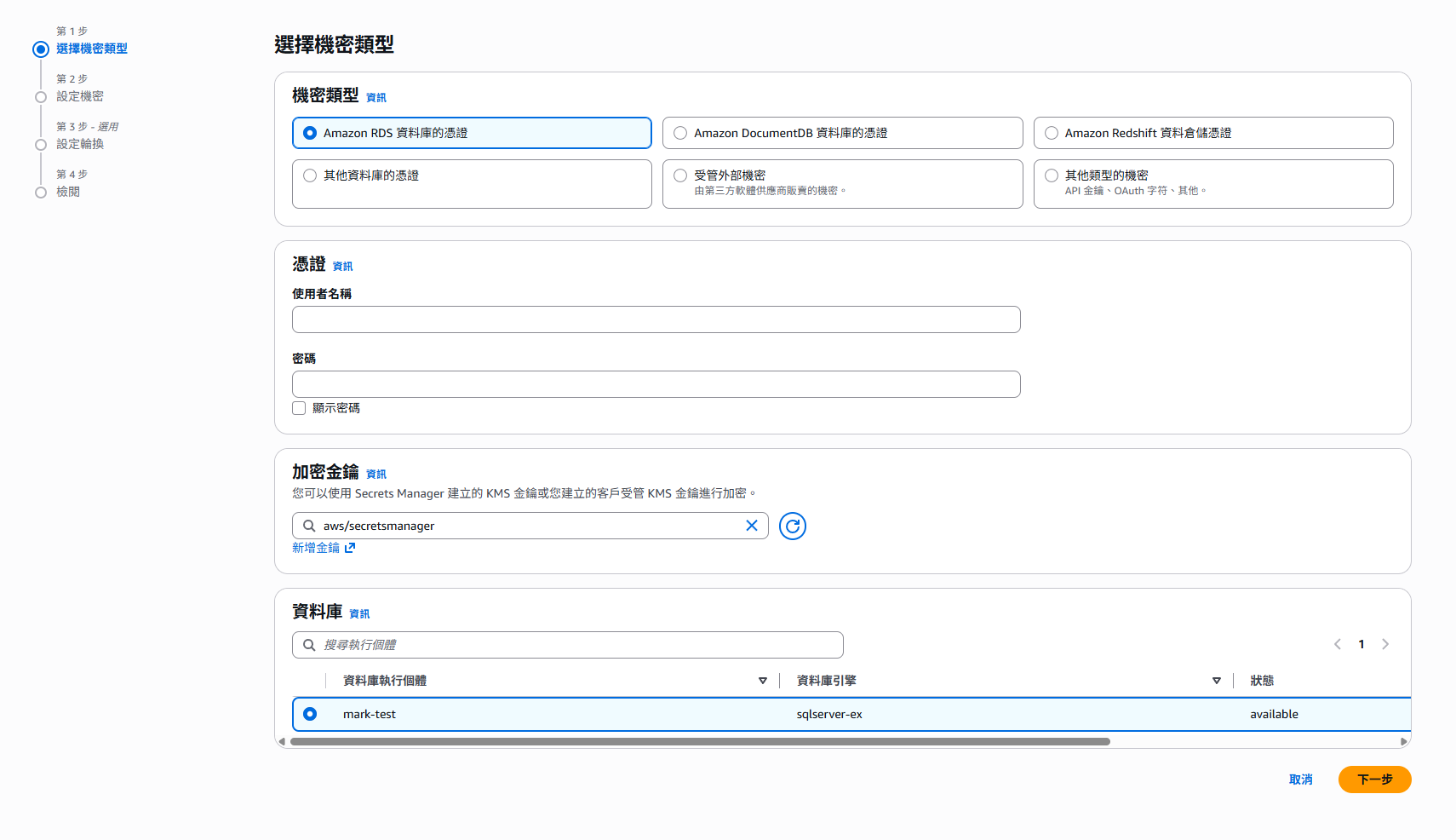
The secret must contain at least the
usernameandpasswordkeys. If you create the secret manually, choose the “Credentials for Amazon RDS database” type so the format is less likely to be wrong.
Create the IAM Policy and IAM Role
The proxy needs an IAM role to read the secret. The flow is the same as the IAM roles in the previous two articles: create a policy first, then create a role that rds.amazonaws.com can assume.
The policy needs at least secretsmanager:GetSecretValue. If the secret is encrypted with a customer managed KMS key, it also needs kms:Decrypt:
1
2
3
4
5
6
7
8
9
10
11
12
13
14
15
16
17
18
19
20
21
22
{
  "Version": "2012-10-17",
  "Statement": [
    {
      "Effect": "Allow",
      "Action": "secretsmanager:GetSecretValue",
      "Resource": [
        "arn:aws:secretsmanager:<region>:<account-id>:secret:<secret-name>-*"
      ]
    },
    {
      "Effect": "Allow",
      "Action": "kms:Decrypt",
      "Resource": "arn:aws:kms:<region>:<account-id>:key/<key-id>",
      "Condition": {
        "StringEquals": {
          "kms:ViaService": "secretsmanager.<region>.amazonaws.com"
        }
      }
    }
  ]
}
The trust policy allows rds.amazonaws.com to assume the role:
1
2
3
4
5
6
7
8
9
10
11
12
{
  "Version": "2012-10-17",
  "Statement": [
    {
      "Effect": "Allow",
      "Principal": {
        "Service": "rds.amazonaws.com"
      },
      "Action": "sts:AssumeRole"
    }
  ]
}
As in the previous articles, for production environments I recommend adding aws:SourceAccount and aws:SourceArn to narrow the trust scope.
When creating a proxy in the console, the wizard can also create an IAM role for you. That is convenient for a demo environment, but in production it is better to manage the role and policy yourself so the permission boundary is clearer and can be moved into IaC.
Create the Proxy
Open the RDS Console. You can find the Proxies page in the left navigation.
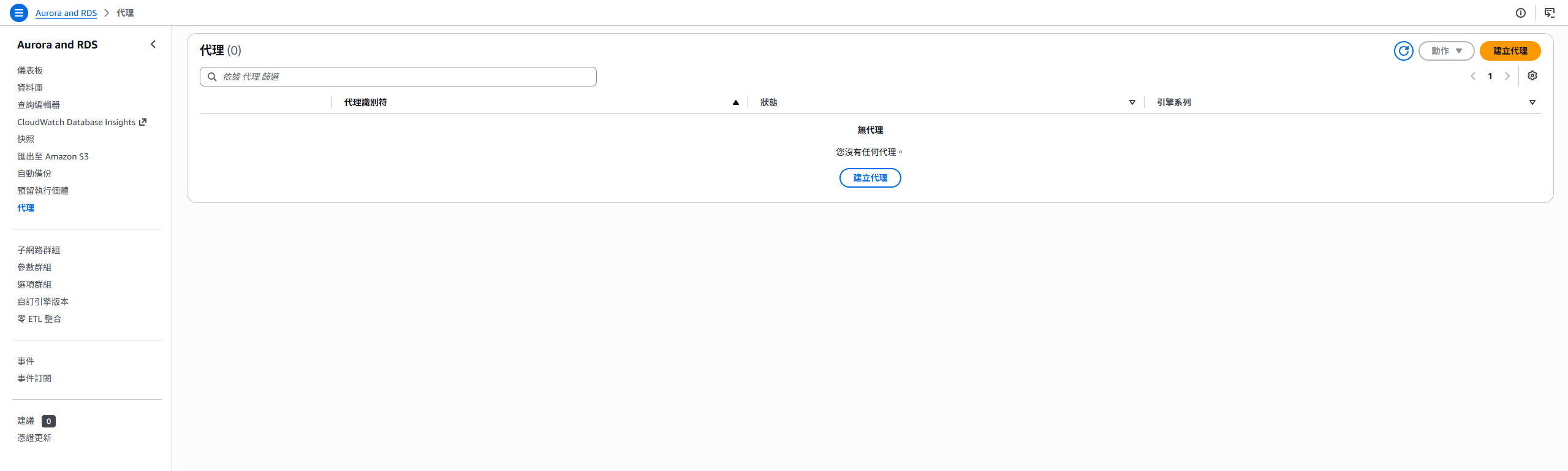
After clicking create, the main settings are:
1
2
3
4
5
6
7
8
9
10
11
12
13
14
15
16
17
18
19
20
21
22
23
24
25
26
27
28
29
30
31
32
33
34
35
36
Proxy configuration
> Engine family
>> Microsoft SQL Server

> Proxy identifier
>> sqlserver-demo-proxy

> Idle client connection timeout
>> 30 minutes (default 30 minutes; adjust based on application behavior)

Target group configuration
> Database
>> sqlserver-express-demo (the DB instance created in the previous article)

> Connection pool maximum connections
>> 100 (the percentage of the database max connections the proxy can use)

Authentication
> Secrets Manager secrets
>> Select the secret prepared earlier (multiple secrets are allowed)

> IAM role
>> Select the IAM role created earlier

> Client authentication type
>> SQL Server authentication

> IAM authentication
>> Disabled (we will change it to Required later for the IAM authentication demo)

Connectivity
> Subnets
>> Select private subnets across at least two AZs

> VPC security groups
>> The dedicated security group for the proxy
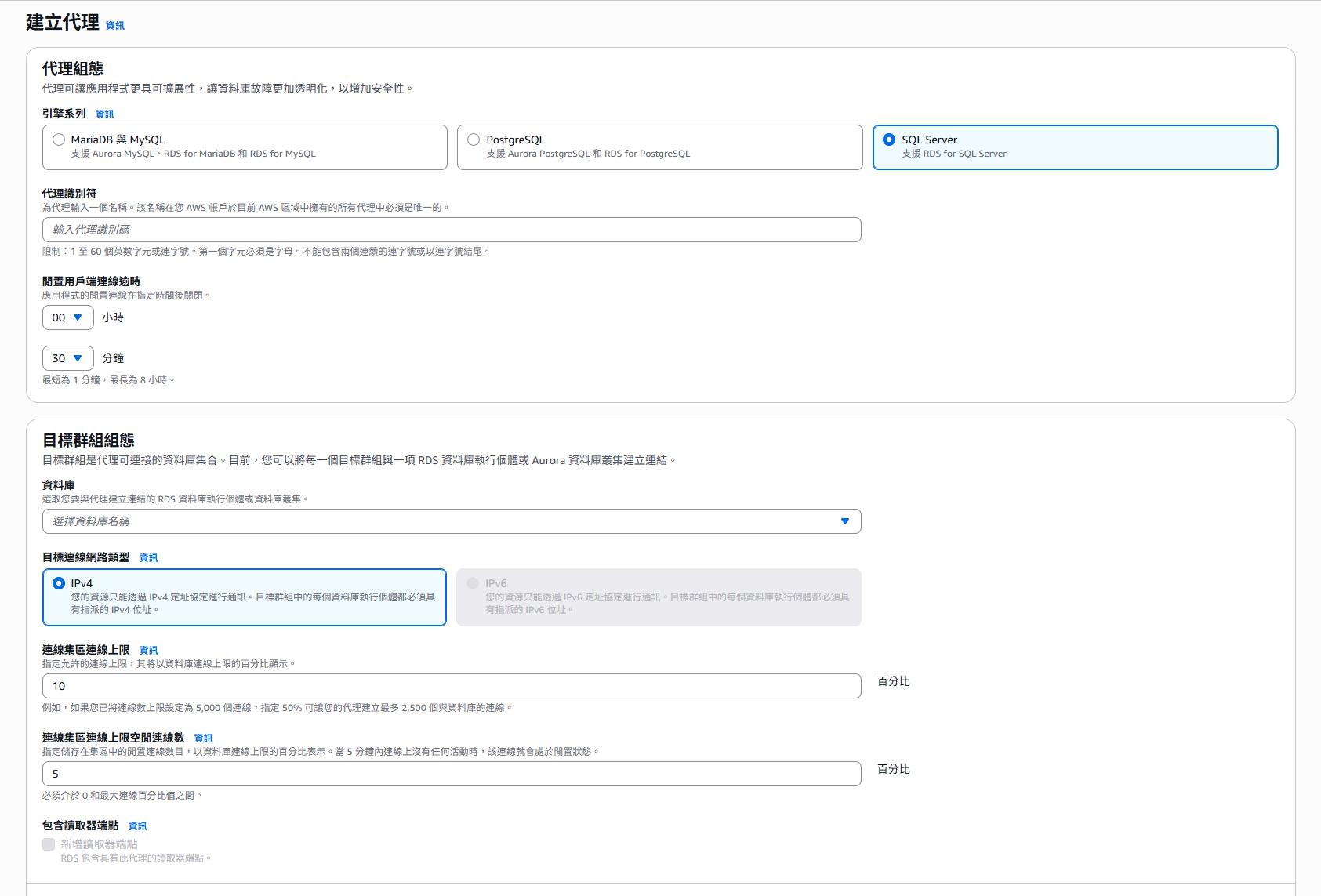
A few settings deserve extra explanation:
- Connection pool maximum connections (
MaxConnectionsPercent): the percentage of the database maximum connections that the proxy can use. If the same database also receives connections that do not go through the proxy, do not set this to 100. - Idle client connection timeout (
IdleClientTimeout): how long an application-side connection can stay idle before the proxy disconnects it. Align this with the application’s connection pool idle setting to avoid reusing connections that the proxy has already closed. - Connection borrow timeout (
ConnectionBorrowTimeout): how long the application request can wait when all database connections are occupied.
After creation, wait for the proxy status to become Available. Then you can find the proxy endpoint on the details page.
After the proxy is created, first check the Targets section on the proxy details page and confirm that the target status is
AVAILABLE. If it staysunavailable, the most common causes are mismatched secret credentials, an IAM role that cannot read the secret, or a security group rule missing between the proxy and RDS.
Client Authentication Methods
RDS Proxy provides two authentication methods for the application-to-proxy segment. The important point is that whichever method you choose, the proxy-to-database segment still uses the Secrets Manager secret.
| Authentication method | Description | Suitable scenarios |
|---|---|---|
| SQL Server password authentication | The application connects to the proxy with database credentials, and the proxy checks the secret content | Existing applications can switch with minimal change by replacing only the host in the connection string |
| IAM authentication | The application uses its IAM identity to generate a short-lived token and connects to the proxy through the access token property supported by the driver, without knowing the database password | Compute resources that already have IAM roles, such as ECS, EKS, Lambda, and EC2 |
This maps to two proxy fields:
- Client authentication type (
ClientPasswordAuthType): for SQL Server, chooseSQL_SERVER_AUTHENTICATION. - IAM authentication (
IAMAuth):Disabledmeans password authentication only;Requiredmeans all connections must use an IAM token.
Method 1: SQL Server Password Authentication
This is the default and simplest method. The steps are as follows.
First, confirm that the proxy IAM authentication setting is disabled (Disabled).
Second, confirm that the account used by the application has a corresponding secret attached to the proxy. The username and password used by the application must match one of the secrets. After the proxy receives the connection, it checks the credentials against the secret. Only after the authentication succeeds does it borrow a database connection from the pool.
Third, change the application connection string host from the RDS endpoint to the proxy endpoint:
1
2
3
4
Server / Host: <proxy-endpoint>
Port: 1433
User: app_user
Password: the same password stored in the secret
Test with sqlcmd:
1
sqlcmd -S "<proxy-endpoint>,1433" -U app_user -P '<password>' -Q "SELECT @@SERVERNAME;"
If the connection succeeds, metrics will start appearing in the proxy Monitoring page.
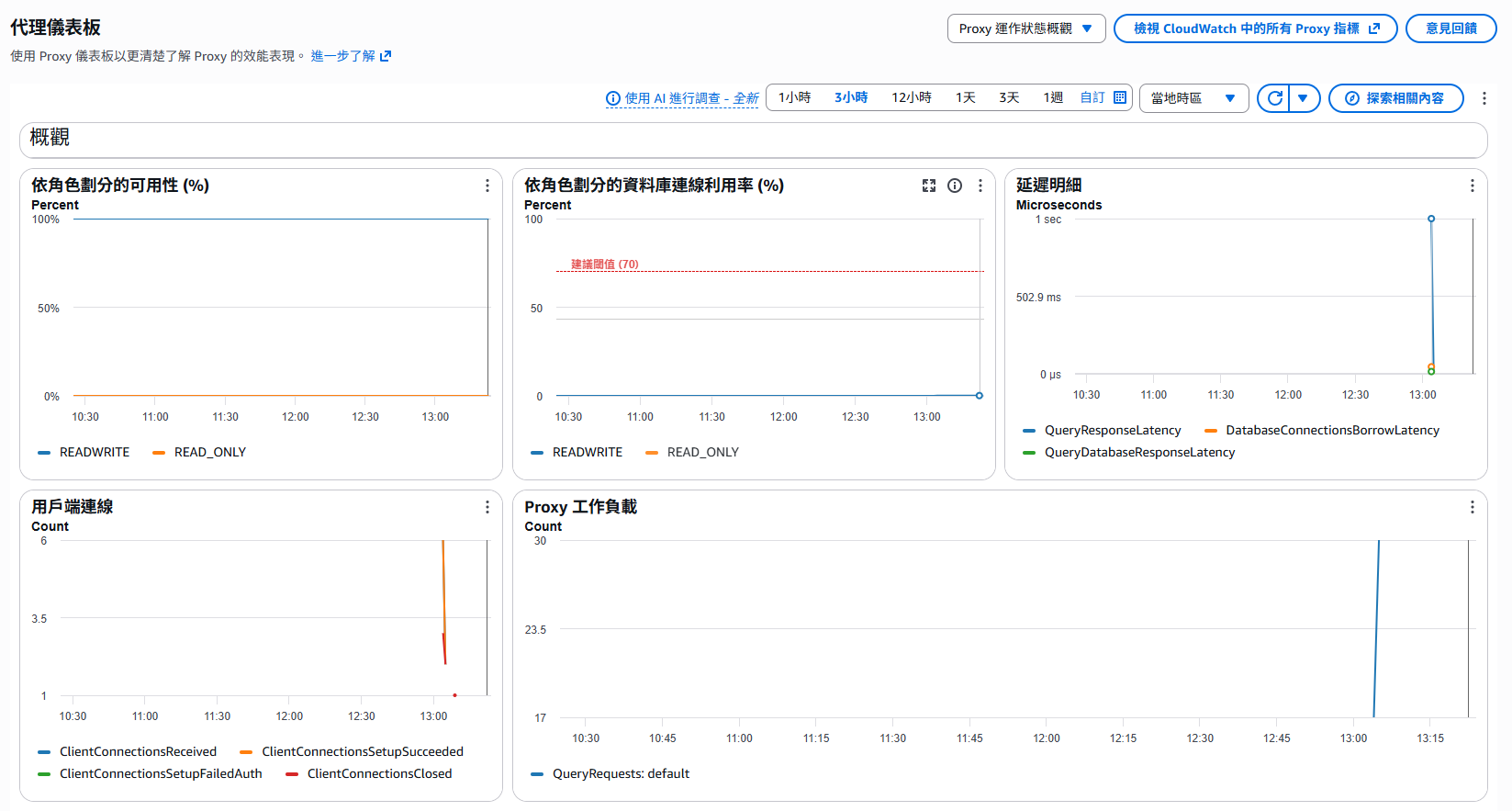
The advantage of this method is that the application almost does not need to change; only the host changes. But the password still exists in the application configuration, so credential governance is only half solved. The proxy-to-database segment follows Secrets Manager rotation, but the application-to-proxy segment still needs its password updated separately.
If the secret has automatic rotation enabled, the application-side password must also be updated after rotation. Otherwise, connections will start failing. To remove this synchronization problem entirely, use IAM authentication.
Method 2: IAM Authentication
IAM authentication lets applications avoid knowing the database password entirely. The application uses its own IAM identity, such as an EC2 instance profile, ECS task role, or Lambda execution role, to generate a token that is valid for 15 minutes. It then connects to the proxy through the access token property supported by the database driver.
It is worth pointing out that RDS for SQL Server itself does not support end-to-end IAM database authentication. In this setup, IAM authentication only applies to the application-to-proxy segment. The proxy still connects to SQL Server using the credentials stored in Secrets Manager.
The setup steps are as follows.
Step 1: Modify the Proxy IAM Authentication Setting
On the proxy details page, choose modify and change IAM authentication to Required.
After changing it to Required, all connections must use an IAM token. The original password authentication will stop working. If you need a gradual migration, validate the full flow in a test environment first.
Step 2: Grant the Application IAM Identity rds-db:connect
Add a policy to the IAM role used by the application, allowing it to connect to this proxy:
1
2
3
4
5
6
7
8
9
10
{
  "Version": "2012-10-17",
  "Statement": [
    {
      "Effect": "Allow",
      "Action": "rds-db:connect",
      "Resource": "arn:aws:rds-db:<region>:<account-id>:dbuser:<proxy-resource-id>/app_user"
    }
  ]
}
Pay attention to the ARN format:
- The service is
rds-db, notrds. <proxy-resource-id>is the proxy resource ID. It looks likeprx-0123456789abcdef0. You can find it on the proxy details page or with the CLI. Use the value afterdb-proxy:in the ARN:
1
2
3
aws rds describe-db-proxies \
  --db-proxy-name sqlserver-demo-proxy \
  --query "DBProxies[0].DBProxyArn"
- The final
app_useris the database account name. If multiple accounts should be allowed, list multiple resources. In a demo environment, you can start with*, but in production it is better to specify the exact users.
Step 3: Generate an IAM Token and Connect
On the application or test machine, use the AWS CLI to generate a token. Make sure the hostname is the proxy endpoint, not the RDS endpoint:
1
2
3
4
5
aws rds generate-db-auth-token \
  --hostname <proxy-endpoint> \
  --port 1433 \
  --username app_user \
  --region <region>
The output is a long token. For SQL Server, do not put the token into the normal password field. Use the token/access token property provided by the driver instead. The username remains app_user. For example, JDBC uses accessToken, ODBC uses sql_copt_ss_access_token, and .NET SqlClient uses AccessToken.
IAM authentication requires TLS, so encryption must be enabled in the connection string. With .NET SqlConnection, for example, keep the username and encryption settings in the connection string, then assign the token to AccessToken:
1
2
3
4
5
6
var token = "<generate-db-auth-token output or SDK-generated token>";

using var connection = new SqlConnection(
    "Server=<proxy-endpoint>,1433;User ID=app_user;Encrypt=True;Database=my_app;");
connection.AccessToken = token;
await connection.OpenAsync();
In other words, if the client tool or driver does not support a SQL Server access token property, it cannot be used to test this IAM authentication mode. Passing the token as a -P password usually results in login failed.
Token generation differs by language, but the important points are the same: the hostname must be the proxy endpoint, the port must be SQL Server’s
1433, and the username must match the database account in the proxy secret.
Step 4: Handle Token Expiration
The token is valid for 15 minutes, but that only means the authentication window when establishing a connection. Existing connections are not disconnected just because the token expires. The application should do the following:
- Generate a new token before creating each new connection. Do not cache the token as a static password for too long.
- If using a connection pool, confirm that the pool obtains a fresh token when it creates a new connection. Many AWS SDKs or wrapper libraries provide a pattern for this.
IAM authentication errors often only appear as login failed. The message usually does not directly tell you whether the token expired,
rds-db:connectis missing, or TLS is not enabled. When troubleshooting, check in order: whether TLS is enabled, whether the token was generated within 15 minutes, and whether the IAM policy resource ARN is correct, especially the proxy resource ID and username.
Troubleshooting Order When You Cannot Connect to the Proxy
If connecting to the proxy fails, check in this order:
- Whether the proxy status is Available and the target status is
AVAILABLE. - Whether the application-to-proxy security group allows
1433. - Whether the proxy-to-RDS security group allows
1433. - Whether the secret credentials match the actual database credentials. If you copied an RDS-managed secret manually, remember that it will not automatically follow rotation.
- Whether the proxy IAM role can read the secret and KMS key.
- In IAM authentication mode, whether TLS, token validity, and
rds-db:connectpermissions are correct. - Whether the connection is coming from outside the VPC. The proxy endpoint can only be resolved and connected from inside the VPC and does not support public accessibility.
Method 2: Create It with Terraform
Continuing from the Terraform example in the previous article, add the RDS Proxy resources. This example includes the secret, IAM role, proxy, target group configuration, and target registration:
1
2
3
4
5
6
7
8
9
10
11
12
13
14
15
16
17
18
19
20
21
22
23
24
25
26
27
28
29
30
31
32
33
34
35
36
37
38
39
40
41
42
43
44
45
46
47
48
49
50
51
52
53
54
55
56
57
58
59
60
61
62
63
64
65
66
67
68
69
70
71
72
73
74
75
76
77
78
79
80
81
82
83
84
85
86
87
88
89
90
91
92
93
94
95
96
97
98
99
100
101
102
103
104
105
106
107
108
109
110
111
112
113
114
115
116
117
118
119
120
121
122
123
124
125
126
127
128
129
130
131
132
133
134
135
136
137
variable "db_app_username" {
  type    = string
  default = "app_user"
}

variable "db_app_password" {
  type      = string
  sensitive = true
}

resource "aws_secretsmanager_secret" "sqlserver_app_user" {
  name = "rds/sqlserver-express-demo/app-user"
}

resource "aws_secretsmanager_secret_version" "sqlserver_app_user" {
  secret_id = aws_secretsmanager_secret.sqlserver_app_user.id
  secret_string = jsonencode({
    username = var.db_app_username
    password = var.db_app_password
  })
}

resource "aws_security_group" "sqlserver_proxy" {
  name        = "sqlserver-proxy"
  description = "Allow application access to RDS Proxy"
  vpc_id      = var.vpc_id

  ingress {
    description     = "SQL Server from application"
    from_port       = 1433
    to_port         = 1433
    protocol        = "tcp"
    security_groups = [var.app_security_group_id]
  }

  egress {
    from_port   = 0
    to_port     = 0
    protocol    = "-1"
    cidr_blocks = ["0.0.0.0/0"]
  }
}

# Add an inbound rule to the RDS security group to allow the proxy
resource "aws_security_group_rule" "sqlserver_from_proxy" {
  type                     = "ingress"
  from_port                = 1433
  to_port                  = 1433
  protocol                 = "tcp"
  security_group_id        = aws_security_group.sqlserver.id
  source_security_group_id = aws_security_group.sqlserver_proxy.id
  description              = "SQL Server from RDS Proxy"
}

resource "aws_iam_role" "sqlserver_proxy" {
  name = "rds-proxy-sqlserver-demo"

  assume_role_policy = jsonencode({
    Version = "2012-10-17"
    Statement = [
      {
        Effect = "Allow"
        Principal = {
          Service = "rds.amazonaws.com"
        }
        Action = "sts:AssumeRole"
        Condition = {
          StringEquals = {
            "aws:SourceAccount" = data.aws_caller_identity.current.account_id
          }
        }
      }
    ]
  })
}

resource "aws_iam_policy" "sqlserver_proxy_secrets" {
  name = "rds-proxy-sqlserver-demo-secrets"

  policy = jsonencode({
    Version = "2012-10-17"
    Statement = [
      {
        Effect   = "Allow"
        Action   = "secretsmanager:GetSecretValue"
        Resource = aws_secretsmanager_secret.sqlserver_app_user.arn
      }
    ]
  })
}

resource "aws_iam_role_policy_attachment" "sqlserver_proxy_secrets" {
  role       = aws_iam_role.sqlserver_proxy.name
  policy_arn = aws_iam_policy.sqlserver_proxy_secrets.arn
}

resource "aws_db_proxy" "sqlserver" {
  name                = "sqlserver-demo-proxy"
  engine_family       = "SQLSERVER"
  role_arn            = aws_iam_role.sqlserver_proxy.arn
  vpc_subnet_ids      = var.private_subnet_ids
  vpc_security_group_ids = [aws_security_group.sqlserver_proxy.id]

  idle_client_timeout = 1800
  require_tls         = true

  auth {
    auth_scheme               = "SECRETS"
    client_password_auth_type = "SQL_SERVER_AUTHENTICATION"
    iam_auth                  = "DISABLED" # Change to REQUIRED to enforce IAM authentication
    secret_arn                = aws_secretsmanager_secret.sqlserver_app_user.arn
  }

  tags = {
    Name = "sqlserver-demo-proxy"
  }
}

resource "aws_db_proxy_default_target_group" "sqlserver" {
  db_proxy_name = aws_db_proxy.sqlserver.name

  connection_pool_config {
    max_connections_percent      = 100
    max_idle_connections_percent = 50
    connection_borrow_timeout    = 120
  }
}

resource "aws_db_proxy_target" "sqlserver" {
  db_proxy_name          = aws_db_proxy.sqlserver.name
  target_group_name      = aws_db_proxy_default_target_group.sqlserver.name
  db_instance_identifier = aws_db_instance.sqlserver.identifier
}

output "proxy_endpoint" {
  value = aws_db_proxy.sqlserver.endpoint
}
For production use, adjust at least the following:
- Do not pass passwords as plaintext variables. Prefer Secrets Manager generation or a rotation mechanism.
- If switching to IAM authentication, set
iam_authtoREQUIREDand grant the application IAM rolerds-db:connect. - Consider whether there are other connection sources that do not go through the proxy before setting
max_connections_percent. - Keep
require_tls = true. IAM authentication requires TLS, and password authentication should also use encrypted transport.
Pinning: Connection Pooling Is Not a Silver Bullet
The main benefit of RDS Proxy comes from multiplexing: multiple application connections share a smaller number of database connections. However, some operations change session state, making it unsafe for the proxy to reuse the same database connection for other sessions. In that case, the proxy pins the application connection to that database connection until the connection ends. This behavior is called pinning.
A pinned connection still works normally, but it loses the benefit of connection sharing. If most connections are pinned, the proxy degenerates into a simple forwarding layer: you still pay for it, but the benefit is greatly reduced.
For SQL Server, common operations that trigger pinning include MARS, DTC, temporary tables, transactions, cursors, prepared statements, and some SET statements. You can monitor the pinning ratio with the CloudWatch metric DatabaseConnectionsCurrentlySessionPinned.
After adopting the proxy, observe the pinning metric for a period of time. If the pinning ratio is high, first review whether the application heavily uses statements that trigger pinning, then evaluate whether those patterns can be adjusted before deciding whether the proxy is worth keeping.
RDS Proxy for SQL Server Limitations
Know these limitations before adoption:
- The proxy must be in the same VPC as RDS and does not support public accessibility. Applications must connect from inside the VPC or through VPN, peering, or Transit Gateway.
- Windows Authentication is not supported. Client authentication supports only SQL Server authentication and IAM authentication.
- Using MARS (Multiple Active Result Sets) causes session pinning, and the proxy does not run initialization queries. If your connection string enables
MultipleActiveResultSets=True, evaluate whether pinning will cancel out the value of the proxy. - Each proxy can be associated with only one target database, either an instance or a cluster.
- RDS Proxy is a billed service. It is charged based on the vCPU count of the target database and has a minimum billed vCPU count.
Post-Creation Checklist
- The proxy and target statuses are Available /
AVAILABLE. - The application has switched to the proxy endpoint and can query successfully.
- The RDS security group has been restricted to allow only the proxy.
- The selected authentication method has been tested: password authentication confirms the secret synchronization strategy, and IAM authentication confirms the token refresh mechanism.
require_tlsis enabled, and the application connection string enables encryption.- CloudWatch metrics such as
DatabaseConnections,ClientConnections, andDatabaseConnectionsCurrentlySessionPinnedhave been observed. - A failover drill has been performed, and the application behavior during failover meets expectations.
- After Secrets rotation, the proxy and application connection behavior has been verified.
Conclusion
At this point, this series has taken RDS for SQL Server from “it can be created” to “it can be operated”:
- The first article solved the platform: networking, version, storage, backup, and restore.
- The second article solved governance: audit records and password rotation.
- This article solved connections: connection pooling, failover interruption, and letting applications use IAM identities to connect to the database through the proxy.
RDS Proxy is not mandatory. It is an option that trades cost for connection governance. If your system has simple and stable connection behavior, you might not need it. But for serverless workloads, frequent scaling, or systems sensitive to failover interruption, RDS Proxy can usually provide a meaningful stability improvement with relatively small application changes.
After adopting it, remember to look back at the metrics, especially the pinning ratio. The value of a proxy should be validated with data, not assumed just because it has been installed.