Pitfalls When Submitting a Sitemap from GitHub Pages to Google Search Console
A practical note on fixing the 'Couldn't fetch' sitemap issue in Google Search Console for GitHub Pages by using a custom domain, CloudFlare DNS, and GitHub Pages settings.
Let me start with the conclusion.
If you do not have a custom domain,
no matter how you submit your sitemap to Google Search Console,
it may simply never be accepted.
If you want your static website to be indexed by Google faster,
buying a domain and binding it to GitHub Pages is the real solution.
How I Stepped on This Landmine
Background
Around February or March,
I decided to start taking my GitHub Pages site seriously.
First, I replaced the site with a new theme,
then I connected Google Analytics and Google Search Console for management.
The Google Analytics tracking code was verified very quickly.
Google Search Console was also verified smoothly because it could be linked directly through Google Analytics.
But after submitting the sitemap multiple times in Google Search Console,
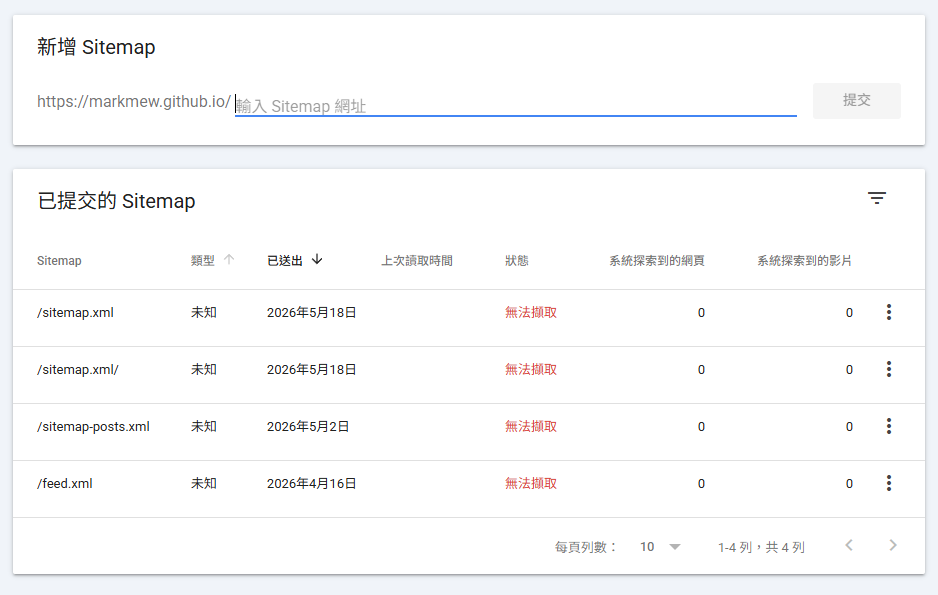
I was honestly speechless.
Not only did I fail to fix the issue,
I also wasted a lot of time discussing it with AI tools and burning tokens on meaningless changes.
The Useless Modification Loop
Useless Suggestions from AI
site.urlis wrongSitemap URLandGSC propertydo not match- The
<lastmod>format may be invalid - The plugin is not supported, so another plugin should generate the sitemap
robots.txtis blocking it- The sitemap contains “invalid URLs” such as js or css assets
- The URL does not actually exist
- Use the simplest possible sitemap
My sitemap was generated with AI tools,
or built with AI-assisted development.
In the end, I validated it with online tools,
and confirmed that it was valid XML and also a valid sitemap.xml.
However, after adding the sitemap in Google Search Console,
the status was always Couldn't fetch.
I am not saying the AI suggestions were bad.
If this were a pure static site hosted on Apache2,
or a server managed by myself,
those suggestions would make sense as a checklist.
But in this case, I was using a static website hosting service,
with many OS-level details that I could not touch.
So those checks may not have been very meaningful.
A Bare-Minimum sitemap.xml
Since a fancy sitemap might contain elements that Google would ignore,
I also tried an almost bare-minimum sitemap.xml.
It only contained the site itself and posts,
without update frequency hints.
But in the end, GSC still did not accept it.
1
2
3
4
5
6
7
8
9
10
11
12
13
14
15
16
17
18
19
20
21
22
23
24
25
26
27
28
29
30
31
32
33
34
35
36
37
38
39
40
41
42
43
44
45
46
47
48
49
50
51
52
53
54
55
56
57
58
59
60
61
62
63
64
65
66
67
68
69
70
71
72
73
74
75
76
77
78
79
80
81
82
83
84
85
86
87
88
89
90
91
92
93
94
95
96
97
98
99
100
101
102
103
104
105
106
107
108
109
110
111
112
113
114
115
116
117
118
119
120
121
122
123
124
125
126
127
128
129
130
131
132
133
134
135
136
137
138
139
140
141
142
143
144
145
146
147
148
149
150
151
152
153
154
155
156
157
158
159
160
161
162
163
164
165
166
167
168
169
170
171
172
173
174
175
176
177
178
179
180
181
182
183
184
185
186
187
188
189
190
191
192
193
194
195
196
197
198
199
200
201
202
203
204
205
206
207
208
209
210
211
212
213
214
215
216
217
218
219
220
221
222
223
224
225
226
227
228
229
230
231
232
233
234
235
236
237
238
239
240
241
242
243
244
245
246
247
248
249
250
<?xml version="1.0" encoding="UTF-8"?>
<urlset xmlns="http://www.sitemaps.org/schemas/sitemap/0.9">

  <url>
    <loc>https://markmew.github.io/</loc>
  </url>


  <url>
    <loc>https://www.markmew.com/posts/kubernetes-secret-vs-configmap/</loc>
    <lastmod>2026-09-13T00:00:00+08:00</lastmod>
  </url>

  <url>
    <loc>https://www.markmew.com/posts/eks-secrets-store-csi-sync-secret/</loc>
    <lastmod>2026-09-11T00:00:00+08:00</lastmod>
  </url>

  <url>
    <loc>https://www.markmew.com/posts/zeabur-security-incident-api-key-leak/</loc>
    <lastmod>2026-08-30T00:00:00+08:00</lastmod>
  </url>

  <url>
    <loc>https://www.markmew.com/posts/cloudfront-geographic-restrictions-and-index-html/</loc>
    <lastmod>2026-08-17T00:00:00+08:00</lastmod>
  </url>

  <url>
    <loc>https://www.markmew.com/posts/how-to-host-static-website-with-s3-and-cloudfront/</loc>
    <lastmod>2026-08-15T00:00:00+08:00</lastmod>
  </url>

  <url>
    <loc>https://www.markmew.com/posts/how-to-host-static-website-on-s3/</loc>
    <lastmod>2026-08-13T00:00:00+08:00</lastmod>
  </url>

  <url>
    <loc>https://www.markmew.com/posts/rds-proxy/</loc>
    <lastmod>2026-07-31T00:00:00+08:00</lastmod>
  </url>

  <url>
    <loc>https://www.markmew.com/posts/rds-sql-server-audit-password-rotation/</loc>
    <lastmod>2026-07-20T00:00:00+08:00</lastmod>
  </url>

  <url>
    <loc>https://www.markmew.com/posts/how-to-set-up-rds-sql-server/</loc>
    <lastmod>2026-07-18T00:00:00+08:00</lastmod>
  </url>

  <url>
    <loc>https://www.markmew.com/posts/self-hosted-oracle-on-ec2-is-heavy/</loc>
    <lastmod>2026-07-17T00:00:00+08:00</lastmod>
  </url>

  <url>
    <loc>https://www.markmew.com/posts/why-you-need-to-adapt-rds-instead-of-self-hosted/</loc>
    <lastmod>2026-07-15T00:00:00+08:00</lastmod>
  </url>

  <url>
    <loc>https://www.markmew.com/posts/monitor-github-credit-usage-with-grafana/</loc>
    <lastmod>2026-07-09T00:00:00+08:00</lastmod>
  </url>

  <url>
    <loc>https://www.markmew.com/posts/enable-s3-metrics/</loc>
    <lastmod>2026-07-09T00:00:00+08:00</lastmod>
  </url>

  <url>
    <loc>https://www.markmew.com/posts/upload-files-to-amazon-s3/</loc>
    <lastmod>2026-07-08T00:00:00+08:00</lastmod>
  </url>

  <url>
    <loc>https://www.markmew.com/posts/will-ai-replace-me/</loc>
    <lastmod>2026-07-07T00:00:00+08:00</lastmod>
  </url>

  <url>
    <loc>https://www.markmew.com/posts/aws-cost-optimization/</loc>
    <lastmod>2026-07-03T00:00:00+08:00</lastmod>
  </url>

  <url>
    <loc>https://www.markmew.com/posts/why-your-scrum-usually-inefficient/</loc>
    <lastmod>2026-07-02T00:00:00+08:00</lastmod>
  </url>

  <url>
    <loc>https://www.markmew.com/posts/html-a-vs-button-vs-input-button/</loc>
    <lastmod>2026-06-28T00:00:00+08:00</lastmod>
  </url>

  <url>
    <loc>https://www.markmew.com/posts/why-i-start-server-at-vm-browser-can-not-connect/</loc>
    <lastmod>2026-06-27T00:00:00+08:00</lastmod>
  </url>

  <url>
    <loc>https://www.markmew.com/posts/uptime-kuma-sso-with-aws-alb-entra-id/</loc>
    <lastmod>2026-06-26T00:00:00+08:00</lastmod>
  </url>

  <url>
    <loc>https://www.markmew.com/posts/when-correlation-becomes-causation/</loc>
    <lastmod>2026-06-22T00:00:00+08:00</lastmod>
  </url>

  <url>
    <loc>https://www.markmew.com/posts/how-to-start-observability/</loc>
    <lastmod>2026-06-17T00:00:00+08:00</lastmod>
  </url>

  <url>
    <loc>https://www.markmew.com/posts/how-to-start-cicd/</loc>
    <lastmod>2026-06-16T00:00:00+08:00</lastmod>
  </url>

  <url>
    <loc>https://www.markmew.com/posts/new-seo-period-when-ai-comes/</loc>
    <lastmod>2026-06-15T00:00:00+08:00</lastmod>
  </url>

  <url>
    <loc>https://www.markmew.com/posts/pitfalls-when-using-ga-on-github-pages/</loc>
    <lastmod>2026-06-14T00:00:00+08:00</lastmod>
  </url>

  <url>
    <loc>https://www.markmew.com/posts/more-about-systems-manager/</loc>
    <lastmod>2026-06-13T00:00:00+08:00</lastmod>
  </url>

  <url>
    <loc>https://www.markmew.com/posts/state-manager/</loc>
    <lastmod>2026-05-16T00:00:00+08:00</lastmod>
  </url>

  <url>
    <loc>https://www.markmew.com/posts/run-command-on-ec2/</loc>
    <lastmod>2026-05-10T00:00:00+08:00</lastmod>
  </url>

  <url>
    <loc>https://www.markmew.com/posts/use-patch-manager-auto-patch-ec2/</loc>
    <lastmod>2026-05-03T00:00:00+08:00</lastmod>
  </url>

  <url>
    <loc>https://www.markmew.com/posts/use-systems-manager-to-manage-server-on-aws/</loc>
    <lastmod>2026-05-02T00:00:00+08:00</lastmod>
  </url>

  <url>
    <loc>https://www.markmew.com/posts/aws-switch-role/</loc>
    <lastmod>2026-04-30T00:00:00+08:00</lastmod>
  </url>

  <url>
    <loc>https://www.markmew.com/posts/iam-role-policy-and-trust-relationship/</loc>
    <lastmod>2026-04-29T00:00:00+08:00</lastmod>
  </url>

  <url>
    <loc>https://www.markmew.com/posts/use-s3-vector-bucket-as-rag/</loc>
    <lastmod>2026-04-18T00:00:00+08:00</lastmod>
  </url>

  <url>
    <loc>https://www.markmew.com/posts/how-to-choose-database-primary-key/</loc>
    <lastmod>2026-04-13T00:00:00+08:00</lastmod>
  </url>

  <url>
    <loc>https://www.markmew.com/posts/aws-eks-irsa-service-account-iam-role/</loc>
    <lastmod>2026-04-10T00:00:00+08:00</lastmod>
  </url>

  <url>
    <loc>https://www.markmew.com/posts/java-date-time-guide/</loc>
    <lastmod>2026-04-06T00:00:00+08:00</lastmod>
  </url>

  <url>
    <loc>https://www.markmew.com/posts/why-iam-policy-version-always-2012/</loc>
    <lastmod>2026-04-02T00:00:00+08:00</lastmod>
  </url>

  <url>
    <loc>https://www.markmew.com/posts/eks-rbac-add-namespace-admin-user/</loc>
    <lastmod>2026-03-31T00:00:00+08:00</lastmod>
  </url>

  <url>
    <loc>https://www.markmew.com/posts/kubernetes-view-multiple-pod-logs/</loc>
    <lastmod>2026-03-12T00:00:00+08:00</lastmod>
  </url>

  <url>
    <loc>https://www.markmew.com/posts/container-in-ec2-do-not-have-permission-via-iam-profile/</loc>
    <lastmod>2026-03-11T00:00:00+08:00</lastmod>
  </url>

  <url>
    <loc>https://www.markmew.com/posts/how-to-prevent-cronjob-failed-impact-autoscaling-failed/</loc>
    <lastmod>2026-03-08T00:00:00+08:00</lastmod>
  </url>

  <url>
    <loc>https://www.markmew.com/posts/create-initial-setting-using-user-data-in-linux/</loc>
    <lastmod>2026-03-03T00:00:00+08:00</lastmod>
  </url>

  <url>
    <loc>https://www.markmew.com/posts/grafana-gpg-error/</loc>
    <lastmod>2025-09-01T00:00:00+08:00</lastmod>
  </url>

  <url>
    <loc>https://www.markmew.com/posts/how-to-reset-gitlab-pipeline-iid/</loc>
    <lastmod>2025-08-30T00:00:00+08:00</lastmod>
  </url>

  <url>
    <loc>https://www.markmew.com/posts/how-to-reset-jenkins-build-number/</loc>
    <lastmod>2025-08-26T00:00:00+08:00</lastmod>
  </url>

  <url>
    <loc>https://www.markmew.com/posts/why-i-start-to-write-blog/</loc>
    <lastmod>2025-08-25T00:00:00+08:00</lastmod>
  </url>

  <url>
    <loc>https://www.markmew.com/posts/string-reversed/</loc>
    <lastmod>2020-06-01T00:00:00+08:00</lastmod>
  </url>

  <url>
    <loc>https://www.markmew.com/posts/magic-world/</loc>
    <lastmod>2019-08-09T00:00:00+08:00</lastmod>
  </url>


</urlset>
The Trust Level of GitHub Pages
👉 How Google may see GitHub Pages:
- Lower crawl frequency
- Lower trust
- Many spammy sites are hosted there
👉 Result: with the same sitemap, a GitHub Pages site may be more likely to be delayed or fail.
While discussing the issue with AI,
one interesting point came up.
Before using a custom domain,
the domain is always GitHubName.github.io,
and all of them end with github.io.
Whether that domain has high enough trust and priority is honestly debatable.
Stability Issues with GitHub Pages
💥 Key point: the long-standing GitHub Pages + Googlebot problem
GitHub Pages has these characteristics:
- CDN (Fastly)
- Cache layer
- Distributed edge nodes
👉 When you run curl, you may hit:
X-Served-By: cache-nrt-xxxx (a Japan node)
👉 But Googlebot:
may crawl from the United States or Europe.
It may hit a different node.
Aside from domain trust,
CDN stability or cross-region crawl stability could also be a factor (though I personally do not really buy it).
But after checking everything from sitemap generation to the hosting layer,
there was only one solution left for me:
buy a domain and bind it.
How I Solved It
Buying a Domain
I had previously bought domains from GoDaddy.
But CloudFlare has always had some interesting features.
This time, because of those features,
I decided to buy the domain on CloudFlare.
DNS Service
As everyone knows, Google DNS is 8.8.8.8.
CloudFlare also provides a DNS service: 1.1.1.1.
So if I buy and configure the domain there,
maybe DNS propagation will be faster too.
Built-In CDN
Even the free version of CloudFlare includes CDN support.
If I point my domain to CloudFlare,
then for a content-focused GitHub Pages site,
I probably do not need to buy or think about a separate CDN service.
CloudFlare Setup
To point CloudFlare to GitHub Pages, you need to configure four A records and one CNAME record.
| Type | Name | Value |
|---|---|---|
| A | @ | 185.199.110.153 |
| A | @ | 185.199.111.153 |
| A | @ | 185.199.109.153 |
| A | @ | 185.199.108.153 |
| CNAME | www | markmew.github.io |
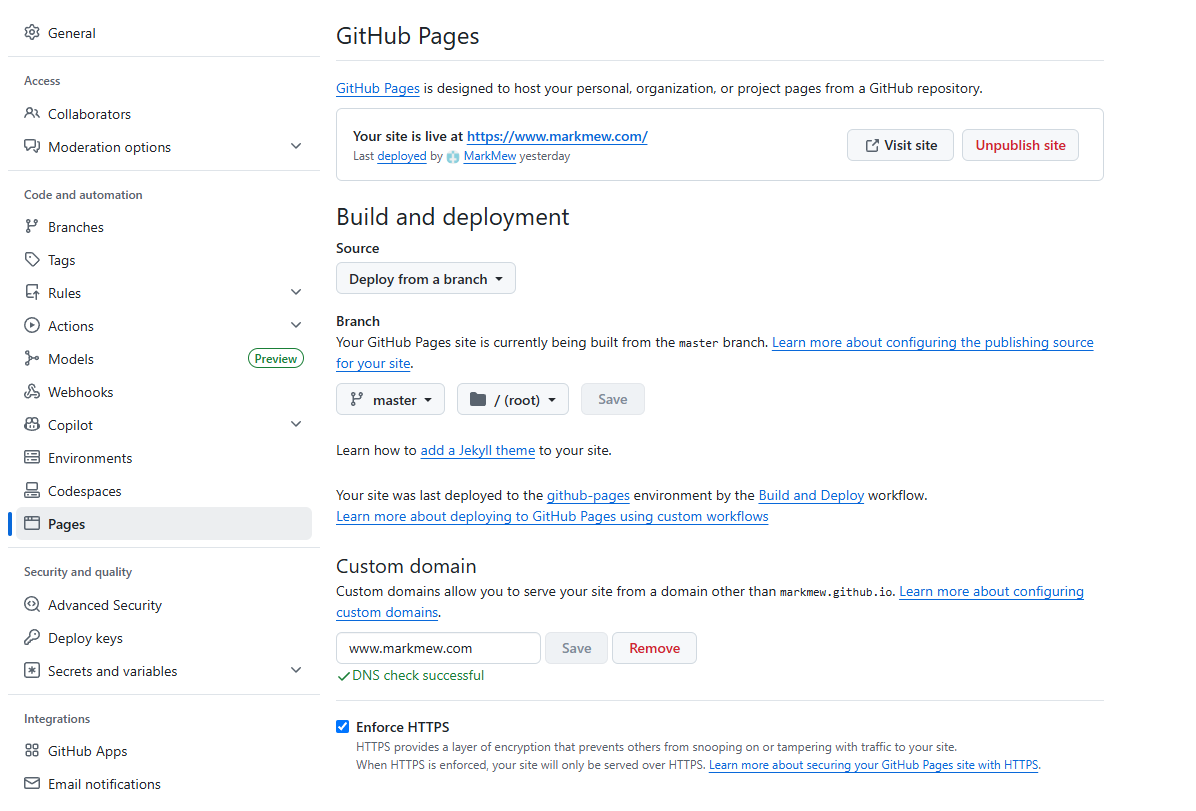
Custom Domain
In the Pages tab on the left,
the Custom domain section at the bottom lets you set a custom domain.
DNS verification may take some time.
Also, every time you refresh the page,
GitHub Pages checks the DNS status again.
After adding the domain, all you can do is wait patiently and do not refresh the page.
Wait until you see DNS check successful.
At this point, I recommend enabling Enforce HTTPS.
Submitting the Sitemap
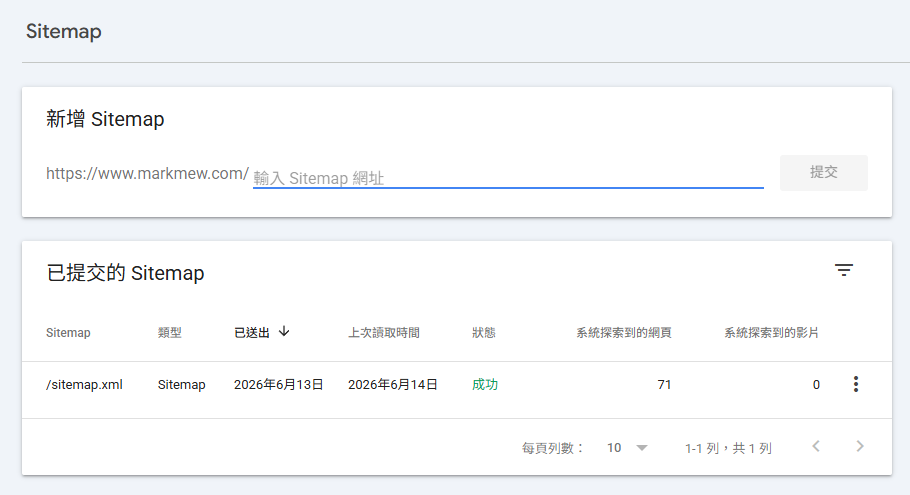
Then we return to Google Search Console.
Unlike GA, GSC does not let you directly change the URL of an existing property.
So you can only add a new property,
and submit the sitemap from that new property.
After submission, Google showed success very quickly.
An Extra Bonus
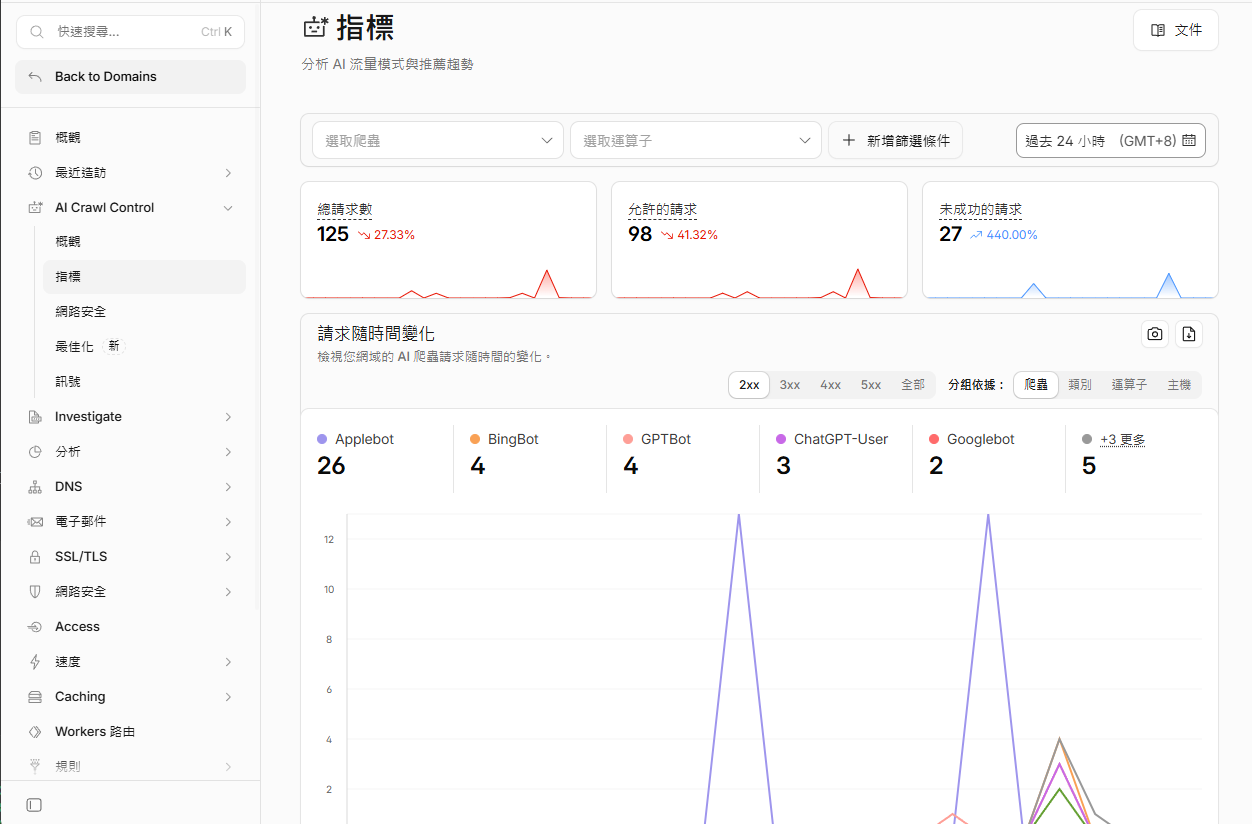
After the sitemap submission succeeded,
I went back the next day to explore some CloudFlare features.
Unexpectedly, CloudFlare provides metrics for AI crawlers.
You can see whether your site has been crawled by AI bots,
or even included by AI agents.
Conclusion
Looking back at the whole process, I spent a lot of time checking sitemap, robots.txt, and all kinds of settings.
But the key step turned out to be very simple: buy a custom domain and bind it.
For a free service like GitHub Pages,
Google Search Console may have lower trust in domains ending with github.io.
So even a perfect sitemap may still be difficult to submit successfully.
The main point is: custom domain = sitemap can be submitted = faster indexing.
If you run into the same issue, buying a domain directly is the most straightforward solution.
The time and energy saved are worth far more than the domain fee.