CloudFront 限制區域存取,並讓路徑自動使用 index.html
延伸 Amazon S3 搭配 CloudFront 架站,介紹 Geographic restrictions,以及使用 CloudFront Functions 將沒有檔名的路徑導向對應資料夾中的 index.html。

上一篇文章介紹了如何使用 Amazon S3 搭配 CloudFront 架設靜態網站。完成基本架構後,還有兩個常見需求:
- 只允許特定國家或地區的使用者存取網站。
- 使用者開啟
/docs或/docs/時,自動載入/docs/index.html。
第一個需求可以使用 CloudFront 的 Geographic restrictions;第二個需求則可以使用 CloudFront Functions,在請求送往 origin 前改寫 URI。
這兩項功能處理的是不同問題:Geographic restrictions 負責判斷請求來源的國家或地區,CloudFront Functions 則負責調整請求路徑。
使用 Geographic restrictions 限制區域存取
CloudFront 的 Geographic restrictions 可以在國家層級限制整個 distribution 的內容存取。設定方式有兩種:
| 模式 | 說明 |
|---|---|
| Allowlist | 只有清單中的國家可以存取 |
| Blocklist | 清單中的國家無法存取,其他國家可以存取 |
這項設定會套用到該 distribution 提供的所有檔案。如果只想限制某一個路徑,或需要比國家層級更細緻的判斷,就不適合只使用 CloudFront Geographic restrictions。
在 Console 設定區域限制
進入 CloudFront Console,選擇要修改的 distribution,接著進入 Security 分頁中的 Geographic restrictions,按下 Edit。
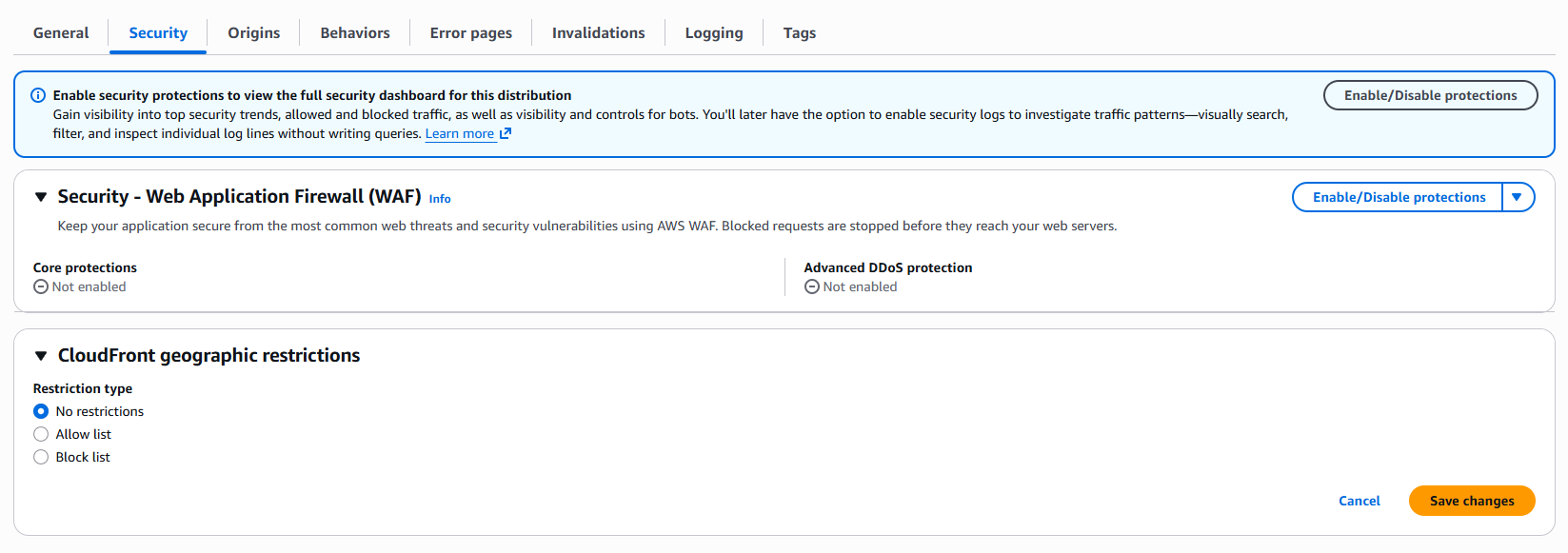
選擇 Allow list 或 Block list,再加入需要允許或封鎖的國家。國家使用 ISO 3166-1 alpha-2 代碼表示,例如:
TW:TaiwanJP:JapanUS:United StatesSG:Singapore
儲存後等待 distribution 部署完成,CloudFront 就會開始依照使用者的地理位置處理請求。被限制的請求通常會收到 403 Forbidden。
Geographic restrictions 是以國家為單位的內容分發限制,不是身分驗證或完整的安全邊界。CloudFront 依據 IP 地理位置資料判斷使用者所在國家;如果無法判斷位置,CloudFront 可能仍會提供內容。需要保護敏感資料時,仍應搭配登入驗證、簽名 URL、AWS WAF 或其他存取控制機制。
Terraform 設定 Geographic restrictions
如果前一篇的 Terraform 已經建立 CloudFront distribution,只需要修改 distribution 裡的 restrictions:
1
2
3
4
5
6
restrictions {
  geo_restriction {
    restriction_type = "whitelist"
    locations        = ["TW", "JP"]
  }
}
上述設定代表只有台灣與日本的請求可以存取內容。如果要使用封鎖清單,將 restriction_type 改成 blacklist 即可:
1
2
3
4
5
6
restrictions {
  geo_restriction {
    restriction_type = "blacklist"
    locations        = ["CN", "RU"]
  }
}
如果不需要區域限制,則使用:
1
2
3
4
5
restrictions {
  geo_restriction {
    restriction_type = "none"
  }
}
為什麼需要改寫 index.html
前一篇已經在 CloudFront distribution 設定 Default root object 為 index.html。因此,使用者開啟網站根目錄 / 時,CloudFront 可以回傳根目錄的 index.html。
但這項設定只處理 distribution 的根目錄,不會自動處理其他資料夾。例如:
| 使用者請求 | 期望載入的檔案 |
|---|---|
/ | /index.html |
/docs/ | /docs/index.html |
/docs | /docs/index.html |
/about.html | /about.html |
/assets/app.js | /assets/app.js |
如果 S3 Bucket 中確實有 docs/index.html,但使用者請求 /docs/,CloudFront 不會像 S3 Website endpoint 一樣自動尋找子資料夾的 index 文件。這時可以建立一般的 Function,再將它關聯到 Distribution 的 Viewer request,用來改寫 URI。
建立 Function
進入 CloudFront Console,在左側選單開啟 Functions,按下 Create function。
Warning
舊版教學可能會直接寫「建立 CloudFront Function,選擇
Viewer request」。新版流程拆成兩個地方設定:建立函式時只會看到Function和Connection Function,這篇僅會使用Function;Connection Function是給 TLS handshake 和 Viewer mTLS 使用的,這篇不會用到。
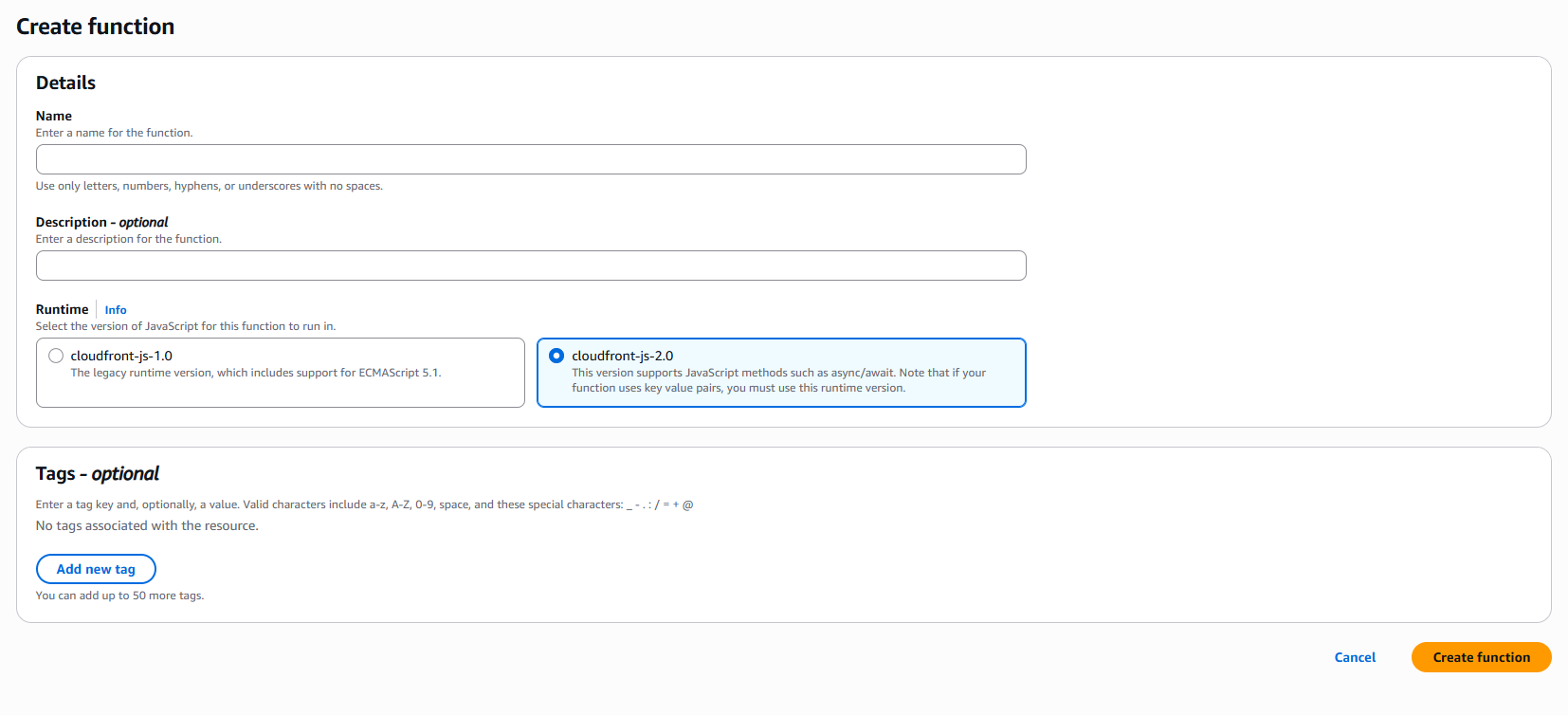
輸入 Function 名稱,Runtime 使用 cloudfront-js-2.0,接著在開發畫面貼上以下程式碼:
1
2
3
4
5
6
7
8
9
10
11
function handler(event) {
    var request = event.request;
    if (request.uri !== "/" && (request.uri.endsWith("/") || request.uri.lastIndexOf(".") < request.uri.lastIndexOf("/"))) {
        if (request.uri.endsWith("/")) {
            request.uri = request.uri.concat("index.html");
        } else {
            request.uri = request.uri.concat("/index.html");
        }
    }
    return request;
}
這段 Function 的處理邏輯如下:
/:不改寫,交給 Default root object 載入/index.html。/docs/:改寫成/docs/index.html。/docs:改寫成/docs/index.html。/about.html:保留原路徑,因為最後一段包含副檔名。/assets/app.js:保留原路徑,不會被當成資料夾。
將 Function 關聯到 Viewer request 後,CloudFront 會在收到使用者請求、查詢快取前執行 Function。Function 改變的是 CloudFront 傳給 origin 的 URI,使用者瀏覽器網址列仍然會維持原本的 /docs 或 /docs/,不會發生 HTTP redirect。
這個寫法適合「資料夾路徑對應資料夾中的
index.html」的靜態網站。如果網站有一個沒有副檔名的實體檔案,例如/download,它會被視為資料夾並改寫成/download/index.html,因此需要依照網站檔案命名方式調整判斷條件。
測試 CloudFront Function
在 Function 的測試畫面中建立 HTTP request 測試事件,輸入不同 URI 來確認改寫結果。
| 測試 URI | 預期改寫結果 |
|---|---|
/ | /,交給 Default root object 處理 |
/docs/ | /docs/index.html |
/docs | /docs/index.html |
/about.html | /about.html |
/assets/app.js | /assets/app.js |
確認測試結果正確後,先按下 Publish,再將 Function 關聯到 CloudFront distribution。只儲存 Function 的 Development 版本並不會影響正式流量。
將 Function 關聯到 CloudFront distribution
進入 CloudFront distribution 的 Behaviors,編輯負責處理網站內容的 Default behavior。
在 Function associations 中新增:
- Event type:
Viewer request - Function type:
Function - Function:選擇剛剛發布的 Function
這裡的 Function 就是一般的 CloudFront Function;Connection Function 不適用於這個 URI rewrite 範例。
儲存後等待 distribution 部署完成。部署完成後,CloudFront 才會在所有 Edge location 執行這個 URI rewrite。
如果網站有多個 cache behavior,必須確認 Function 關聯在正確的 behavior 上。只修改 Default behavior,不代表其他更具體的 path pattern 也會套用相同 Function。
使用 Terraform 管理 CloudFront Function
可以使用 aws_cloudfront_function 建立一般的 Function,再使用 function_association 將它關聯到 CloudFront distribution:
1
2
3
4
5
6
7
8
resource "aws_cloudfront_function" "directory_index" {
  name    = "directory-index"
  runtime = "cloudfront-js-2.0"
  comment = "Rewrite directory paths to index.html"
  publish = true

  code = file("${path.module}/functions/directory-index.js")
}
在原本的 aws_cloudfront_distribution resource 的 default_cache_behavior 中加入以下區塊:
1
2
3
4
5
# 放在 aws_cloudfront_distribution 的 default_cache_behavior 內
function_association {
  event_type   = "viewer-request"
  function_arn = aws_cloudfront_function.directory_index.arn
}
functions/directory-index.js 的內容就是前面 CloudFront Console 使用的 JavaScript。Terraform 的 publish = true 會發布可供 distribution 使用的版本;如果 Function 已經被 distribution 關聯,就不能直接刪除 Function,必須先移除 association。
Terraform 另有獨立的 aws_cloudfront_connection_function resource,但它是給 Connection Function 與 Viewer mTLS 使用的,不能取代這裡的 aws_cloudfront_function。
測試與快取失效
完成 Geographic restrictions 與 Function 設定後,建議依序測試:
- 從允許的國家開啟 CloudFront domain,確認
/可以載入首頁。 - 開啟
/docs/,確認實際回傳/docs/index.html的內容。 - 開啟
/docs,確認沒有結尾斜線時也能載入相同頁面。 - 開啟
/about.html與/assets/app.js,確認檔案路徑沒有被錯誤改寫。 - 從被封鎖的國家或測試環境確認請求會收到
403。
CloudFront Function 的新版本或 association 部署完成後,如果仍然看到舊結果,可以建立 invalidation:
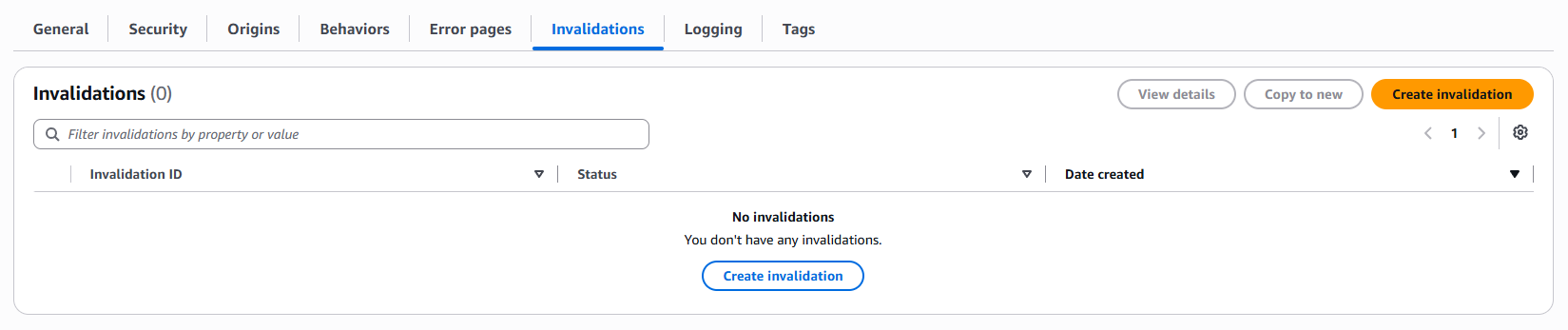
如果習慣使用 CLI,則可以輸入以下的語法:
1
2
3
aws cloudfront create-invalidation \
  --distribution-id YOUR_DISTRIBUTION_ID \
  --paths "/*"
一般 CloudFront Function 的限制
一般 Function 適合執行輕量、低延遲的 URI 或 header 處理,但不是完整的後端執行環境。常見限制包括:
- 只能關聯到
Viewer request或Viewer response事件。 - 無法存取 request body。
- 無法直接存取網路、檔案系統或環境變數。
- 不適合執行複雜運算或需要長時間執行的工作。
- 每個 cache behavior 的同一個事件只能關聯一個 CloudFront Function。
Connection Function 使用的是 Connection request 事件,和一般 Function 的 Viewer request/Viewer response 不同。
如果需要存取 request body、呼叫外部服務,或在 origin request / origin response 階段處理邏輯,應該評估 Lambda@Edge 或其他後端服務,而不是硬塞進 CloudFront Functions。
結語
CloudFront Geographic restrictions 和一般 CloudFront Function 可以分別處理兩種常見需求:
- Geographic restrictions:限制哪些國家或地區可以存取 distribution 內容。
- Function:在請求送往 S3 前,將
/docs或/docs/改寫成/docs/index.html。
前者是國家層級的內容分發限制,後者是邊緣節點上的輕量 URI rewrite。將兩者搭配使用,可以讓 S3 + CloudFront 靜態網站在維持私有 S3 Bucket 的同時,也具備較自然的資料夾網址與基本的區域存取控制。
Connection Function 則是處理 TLS handshake 與 Viewer mTLS 憑證驗證的另一種函式類型,這篇文章不會使用它。
參考資料
- Restrict the geographic distribution of your content
- Create a CloudFront function
- CloudFront connection functions
- Add index.html to request URLs without a file name in a CloudFront Functions viewer request event
- Restrictions on CloudFront Functions
- AWS Provider: aws_cloudfront_function
- AWS Provider: aws_cloudfront_connection_function
- AWS Provider: aws_cloudfront_distribution