Three Levels of String Reversal: Junior Writes for, Beginner Uses reverse, Expert Uses \u202E?
Compare three ways to reverse a JavaScript string: writing a for loop, using reverse, and the Unicode \u202E display trick.
Last week, I saw an interesting post in a frontend community about reversing a string.
The discussion-triggering post is shown below:
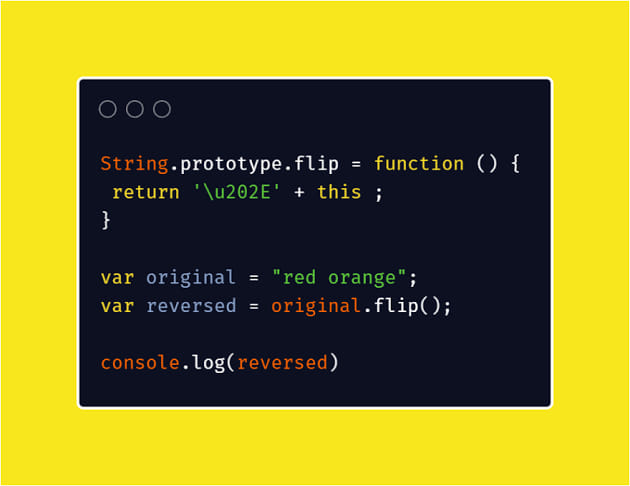
The same requirement can lead to three completely different levels of solutions.
Junior: Write a for Loop
When first learning to program, the most intuitive solution is to start at the final character, walk backward with a for loop, and append each character to a new string.
1
2
3
4
5
6
7
8
const text = "Hello";
let reversed = "";

for (let i = text.length - 1; i >= 0; i--) {
  reversed += text[i];
}

console.log(reversed); // olleH
This version is easy to follow and is useful for practicing loops and indexes. It is also longer, and an incorrect starting index or boundary can easily cause a bug.
Beginner: Use reverse
Once you know JavaScript’s built-in methods, you can expand the string into an array, call reverse(), and join it back together.
1
2
3
4
const text = "Hello";
const reversed = [...text].reverse().join("");

console.log(reversed); // olleH
This is shorter and clearly communicates its intent. For emoji and combining characters made from multiple Unicode code points, however, a robust implementation still needs to understand grapheme clusters.
Expert: Solve It with \u202E?
The post takes an entirely different approach. Add the Unicode direction-control character \u202E, and the following text is displayed from right to left:
1
2
3
4
const text = "Hello";
const reversed = "\u202E" + text + "\u202C";

console.log(reversed);
\u202E is the Right-to-Left Override (RLO), while \u202C ends the directional formatting. The text looks reversed on screen, but its stored character order has not changed at all.
Calling this the “expert solution” is, of course, the joke. It is a fun piece of Unicode dark magic, not genuine string reversal. Direction-control characters can also confuse reading, searching, copy and paste, and even security reviews, so they should not replace for or reverse() in real features.
For ordinary strings, the readable reverse() approach is usually enough. If complex Unicode text matters, use an implementation that understands text boundaries. As for \u202E, it is safer in interview memes and dark-magic demonstrations.